Simplifying Learning Journeys: Redesigning COGNIGIX’s LMS to Empower Users with Intuitive Course Creation

COGNIGIX platform and services focus on creating engaging and effective learning journeys that address specific business and people challenges, combining traditional learning methods with modern digital technologies

Not interested in my design process? No worries at all.

Skip to final product

Team

Team

Type

Learning Management System

Team

PM, 2 Designers, 1 Business Analyst

Role

UX/UI Designer

Platform

Desktop

Responsibility

Design Vision

Tools

Figma

Timeline & Completion

(3 Months) April 2022

The Problem

The Problem

Since 2018, cognigix LMS was built for single-client use. As we expanded to support multiple clients, administrators began facing daily operational hurdles—routine tasks became complex and time-consuming due to an outdated tech stack.

Since 2018, cognigix LMS was built for single-client use. As we expanded to support multiple clients, administrators began facing daily operational hurdles—routine tasks became complex and time-consuming due to an outdated tech stack.

Beyond these operational challenges, the interface presented its own set of problems. Users struggled with inconsistent layouts, poor font alignment, and a lack of design consistency across modules. Low color contrast and unclear navigation made it difficult to quickly find and complete important tasks, resulting in frustration and increased support requests.

Beyond these operational challenges, the interface presented its own set of problems. Users struggled with inconsistent layouts, poor font alignment, and a lack of design consistency across modules. Low color contrast and unclear navigation made it difficult to quickly find and complete important tasks, resulting in frustration and increased support requests.

To enable administrators to work efficiently and confidently, we needed to streamline workflows and establish a clear, cohesive user experience that reduces friction at every step.

To enable administrators to work efficiently and confidently, we needed to streamline workflows and establish a clear, cohesive user experience that reduces friction at every step.

Design Process

Design Process

Research

Research

Personas

Personas

Ideations

Ideations

Prototype

Prototype

Final Deliverables

Final Deliverables

Key Findings

Key Findings

Research

Research

Admin & Learner Portal Design:

Admin & Learner Portal Design:

What achieved?

What achieved?

Here are some of the finding from research & interviews

Here are some of the finding from research & interviews

  • Operations seeks time-saving solutions for onboarding, course creation, and material management.

  • Learners value responsive platforms that are easy to navigate and incorporate feedback.

The client insisted on an easy-to-use, time-saving experience.

The client insisted on an easy-to-use, time-saving experience.

We drew inspiration for the data flow and layout from commonly used daily work services."

We drew inspiration for the data flow and layout from commonly used daily work services."

The learners data flow, layout are inspired from following services.

The learners data flow, layout are inspired from following services.

Personas

Personas

Educational, Industry professionals & Administrators

Educational, Industry professionals & Administrators

The primary user type are educational & industry professionals and administrators. This user group typically includes university & industry administrators, teachers, and instructional designers who are responsible for managing and delivering online courses meanwhile receiving the trainings for the same.

The primary user type are educational & industry professionals and administrators. This user group typically includes university & industry administrators, teachers, and instructional designers who are responsible for managing and delivering online courses meanwhile receiving the trainings for the same.

Administrator

Manage users account, permission & configurations.

Manage users account, permission & configurations.

To assign roles, control access to different parts of the system.

To assign roles, control access to different parts of the system.

Instructors

Create & manage courses.

Create & manage courses.

Upload content.

Upload content.

Track learners progress.

Track learners progress.

Learners

Access and complete training courses.

Access and complete training courses.

Assessments & other learning materials.

Assessments & other learning materials.

Ideation

Ideation

Logical User Flow

Logical User Flow

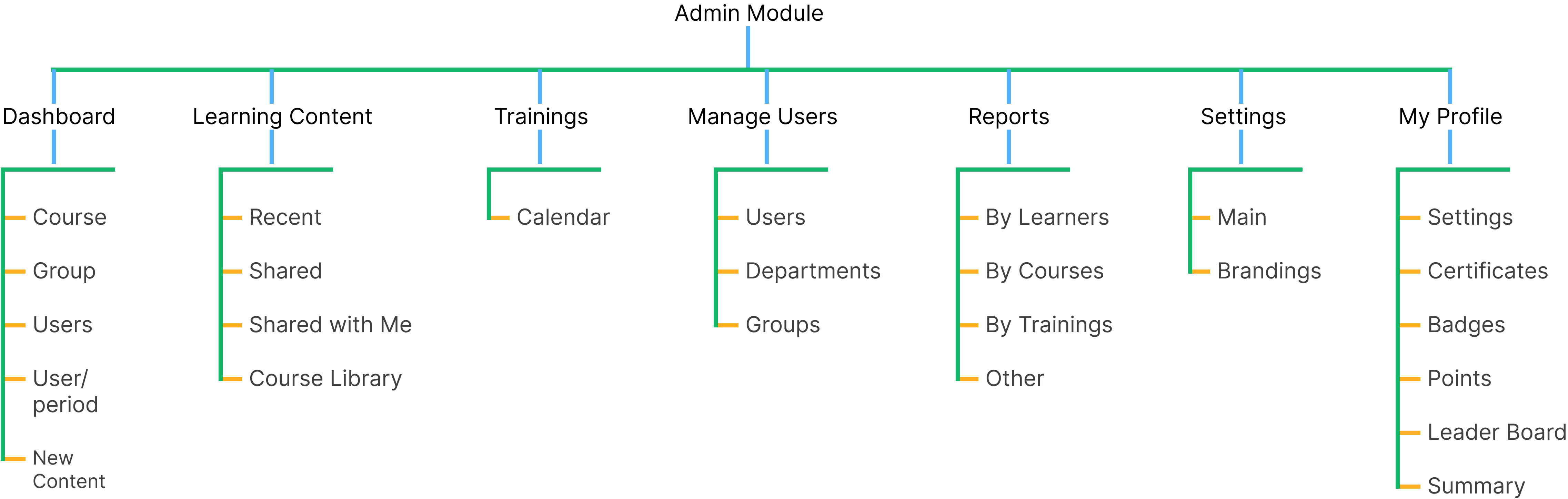
After streamlining the data-flow, re-structuring user flow became possible. It started with creating primary task first for Admin where primary work is manage content, permissions, users etc, the chronology starts with

After streamlining the data-flow, re-structuring user flow became possible. It started with creating primary task first for Admin where primary work is manage content, permissions, users etc, the chronology starts with

Creating content -> User enrollment -> Managing Permissions

Creating content -> User enrollment -> Managing Permissions

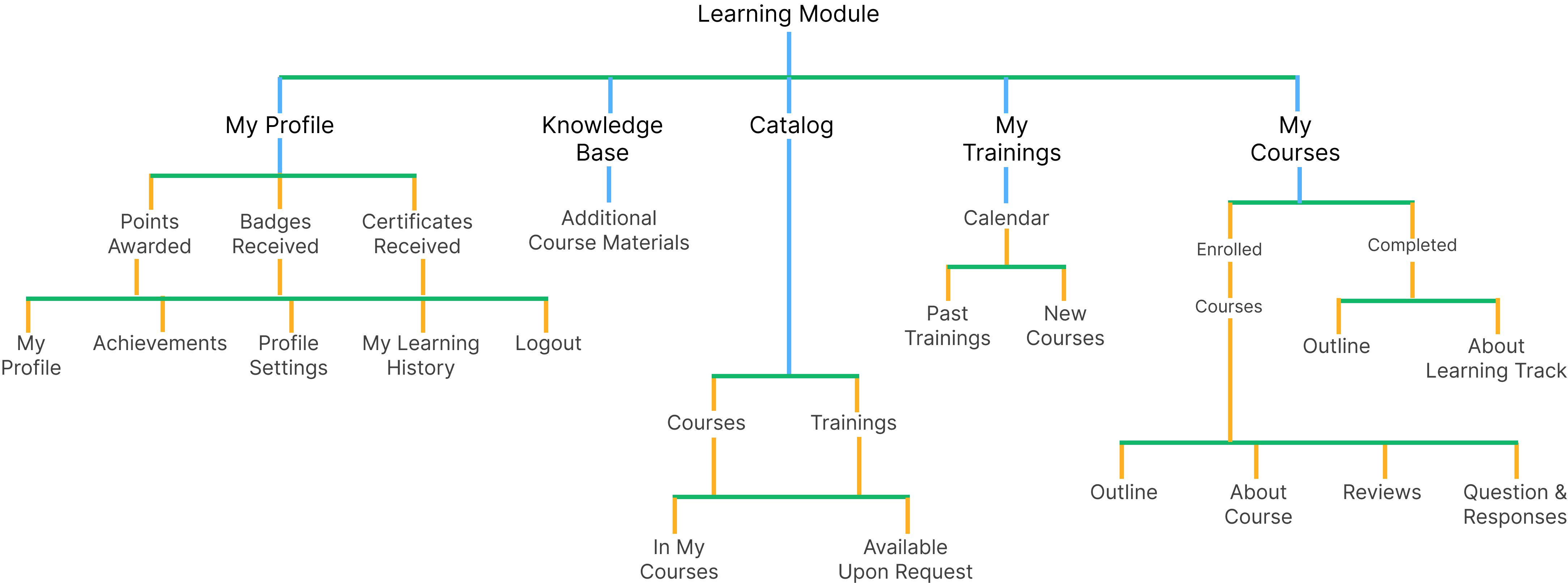
Same goes for Learners
My Courses -> Trainings -> Additional Courses & -> Profile

Same goes for Learners
My Courses -> Trainings -> Additional Courses & -> Profile

Prototype

Prototype

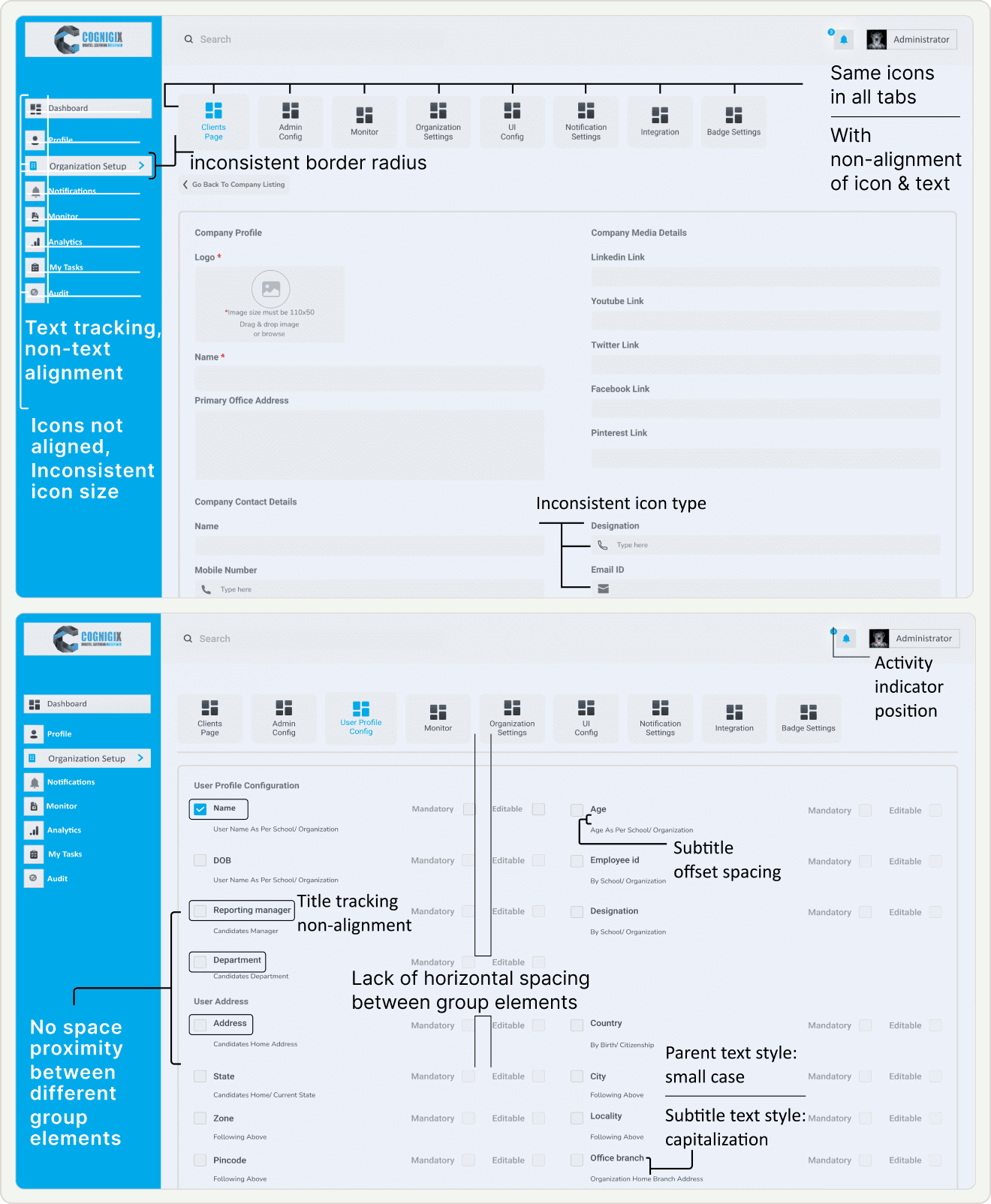
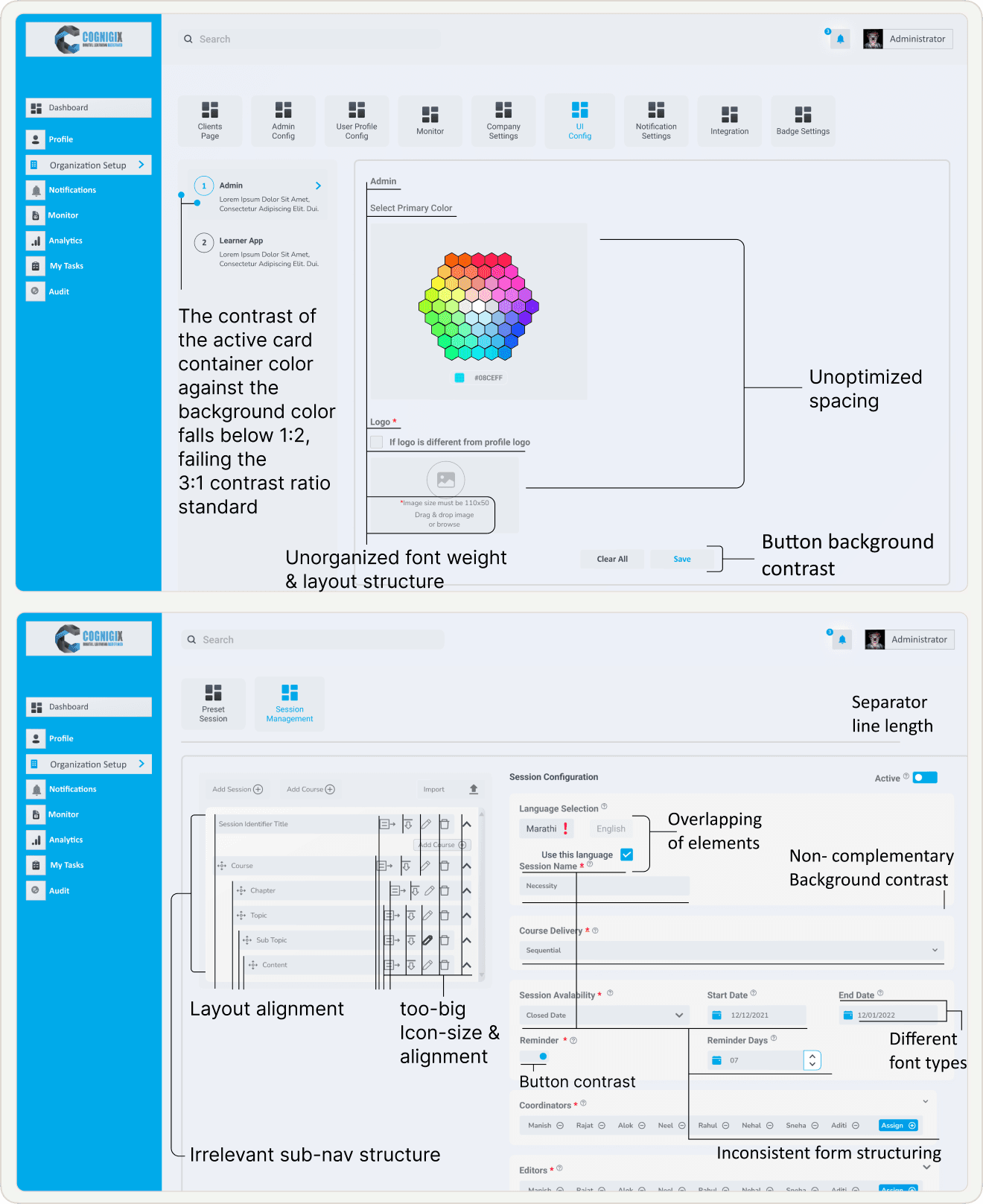
Information Architecture Audit: Admin Side

Information Architecture Audit: Admin Side

Font Inconsistency

Lack Guidance and Hierarchy: Titles associated with each section fail to provide the necessary guidance and hierarchy.

Offset Spacing: Subtitles within the sections exhibit offset spacing issues, resulting in a misalignment with the associated content.

Inconsistent Case: Parent text, in small case, is inconsistent with the title case subtitles, creating a jarring visual contrast.

Navigation Challenges

Tab and Icon Navigation: Similarity in tab structure & icons leads users struggled with the page navigation.

Incomplete naming terminology: of page menu system had made it hard for users to understand and predict the content.

Input-UI Misalignment Issue: Non Alignment of UI layout and interaction patterns with the expected input types.
Information Hierarchy

Decision Fatigue Navigation: Course creation, where the side navigation gives multiple options to go with like course, program, content, topics, etc. by default it must be not-collapse.

Decision Fatigue Form: The form list every data required for course creation that is overwhelming and time consuming. here there are many things that are not necessary to fill right now it can be easily filled out latter, so there is no prioritization of needed input right now & fill rest later to make course creation friction less.

Layout and Icon Inconsistency:

Low Contrast: Buttons on the interface suffer from inadequate background contrast.

Accessibility Concern: Low contrast between the button background and the text can make it difficult for users, especially those with visual impairments, to identify and interact with these critical interface elements.

UI Misalignment: Suboptimal spacing throughout the interface, affecting both visual aesthetics and user experience.

Final Deliverable

Final Deliverable

We have worked on several designs but there are some that are simple yet important for the core on which the entire platform is build & later can be scaled.

We have worked on several designs but there are some that are simple yet important for the core on which the entire platform is build & later can be scaled.

  • Creating Course & Uploading Content

  • Monitoring learners progress

  • Learners tracking their course status

  • Accessible Course home page

The Creation

The Creation

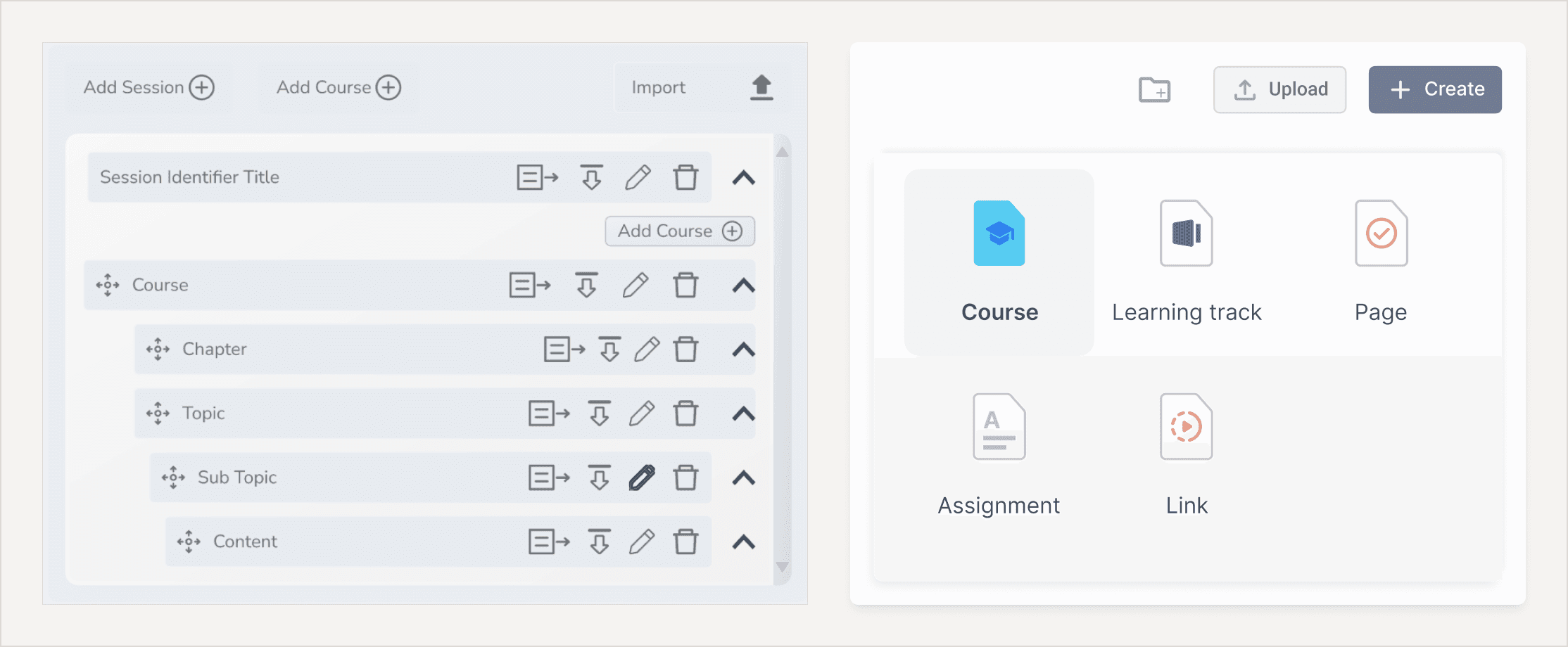
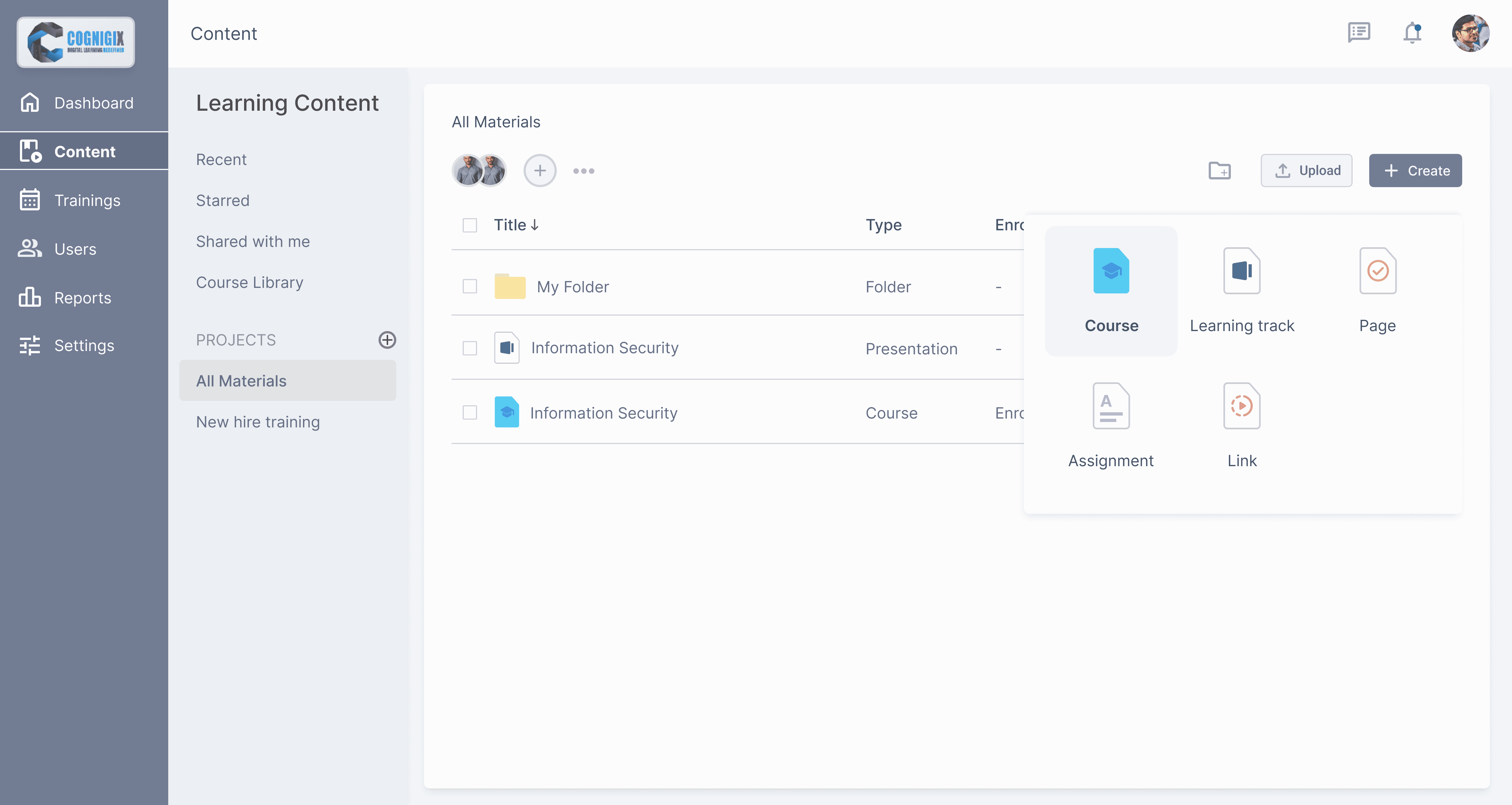
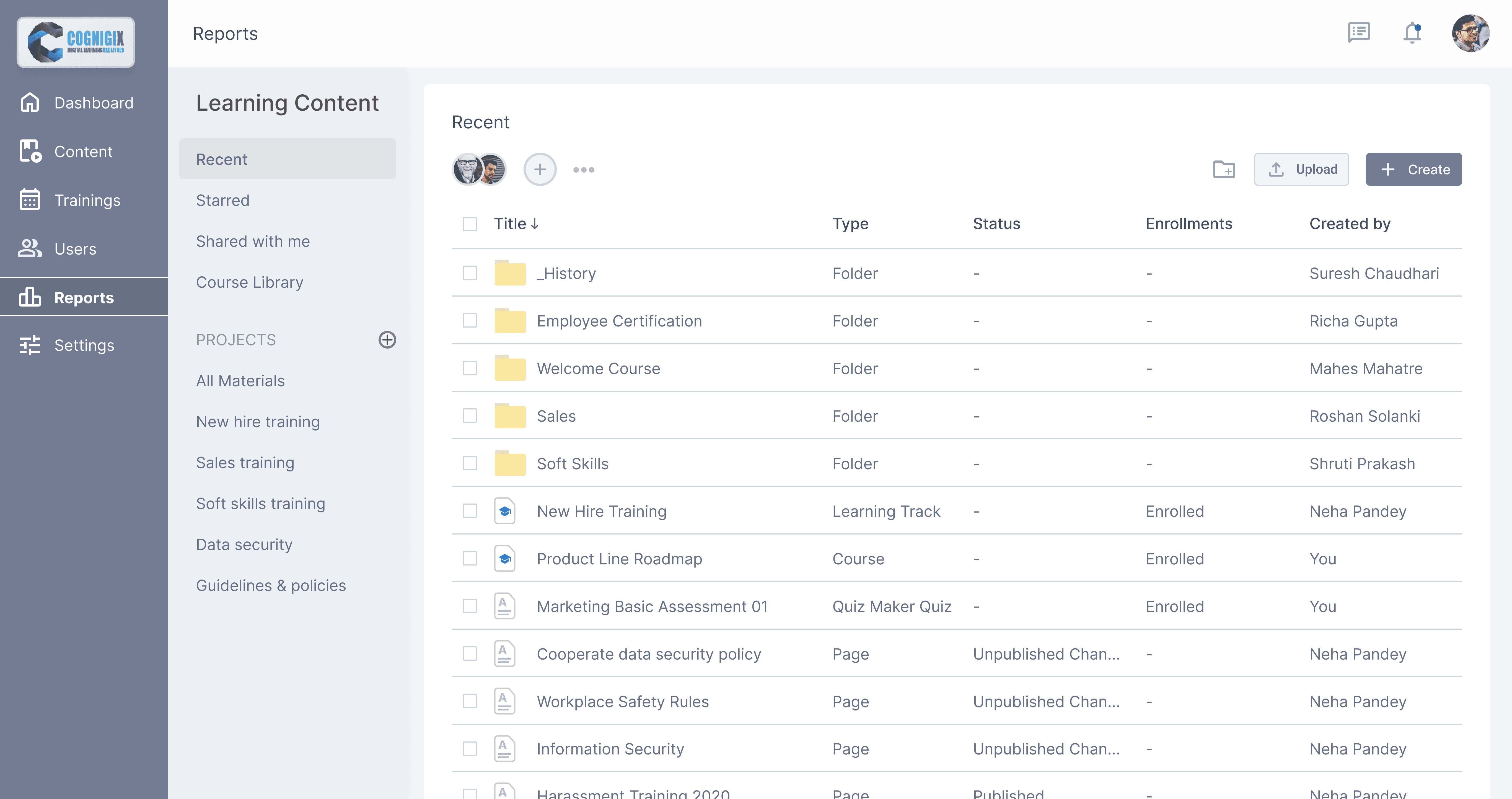
The process of uploading content is similar to working with file-sharing services like Google Drive or Dropbox. Shifting from "form filling" approach to traditional "File Manager" approach from desktop environments.

The process of uploading content is similar to working with file-sharing services like Google Drive or Dropbox. Shifting from "form filling" approach to traditional "File Manager" approach from desktop environments.

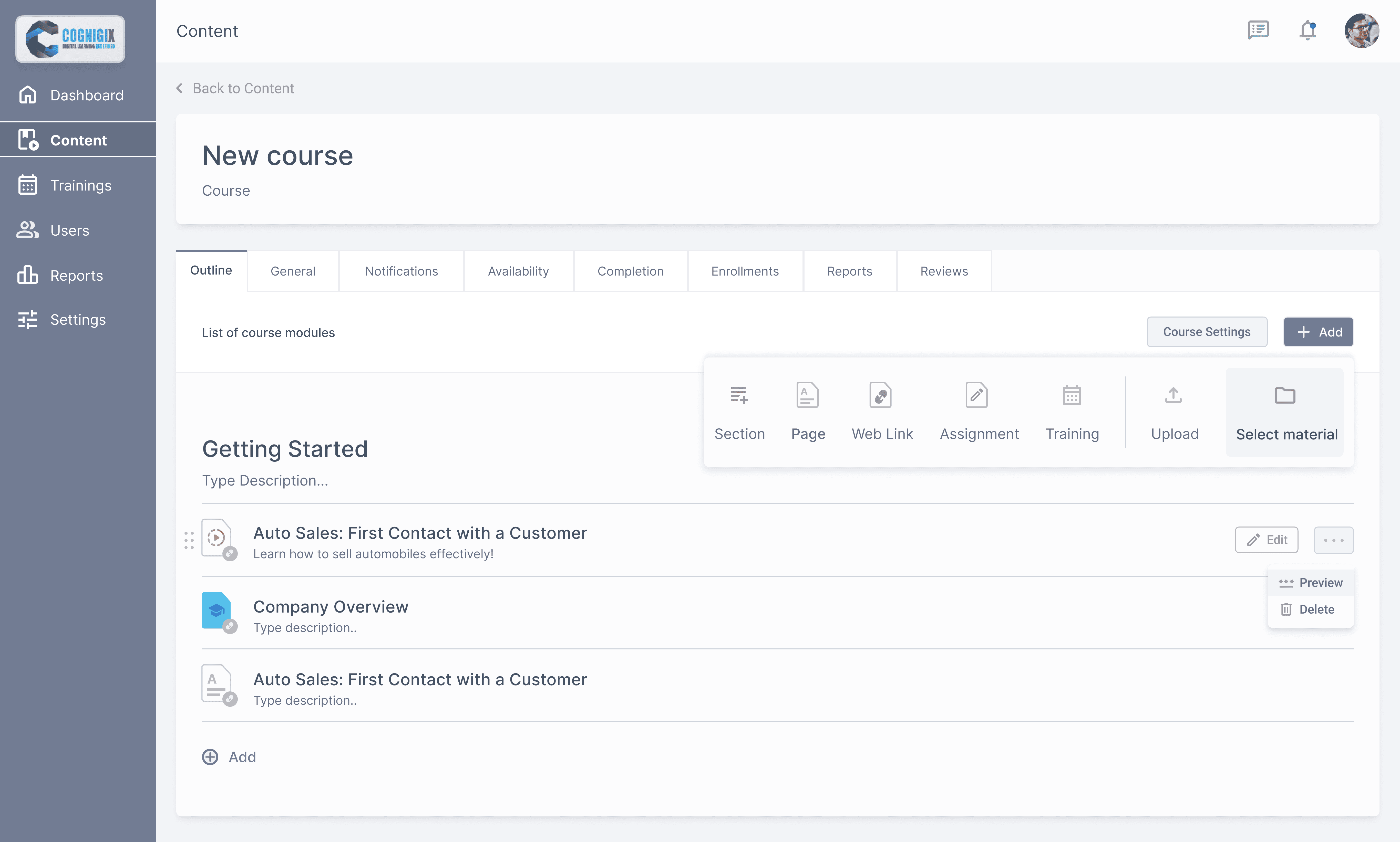
Clicking on the “Upload File” button and select the files from your computer. "Creating Folders" to segregate content based on their type. "Selecting Materials" from content repository to destination folder.

Clicking on the “Upload File” button and select the files from your computer. "Creating Folders" to segregate content based on their type. "Selecting Materials" from content repository to destination folder.

Action Items

Action Items

Components are formed by properties that can, and cannot be changed when using them in code. For example, a dialog can have a title, a body text, and an action button with text values that will change depending on the occasion. Everything else (background color, margins and separations) will invariable remain the same.

Components are formed by properties that can, and cannot be changed when using them in code. For example, a dialog can have a title, a body text, and an action button with text values that will change depending on the occasion. Everything else (background color, margins and separations) will invariable remain the same.

Every actions items have their own set of settings, starting from Selecting Material

Every actions items have their own set of settings, starting from Selecting Material

Monitor your learner & team productivity

Monitor your learner & team productivity

A summary of the entire report will appear above the table with the results.

A summary of the entire report will appear above the table with the results.

Filter action items:

  1. Enrollment type filter to view report on materials by Administrator & Catalog.

Filter action items:

  1. Enrollment type filter to view report on materials by Administrator & Catalog.

  1. Learning Item Name filter you select a course/a training with no users enrolled.

  1. Learning Item Name filter you select a course/a training with no users enrolled.

Primary action items:
1. Learning Item Name button generates a new Learner Results report on the same page. This represents the progress of a specific user.
Track by different type of elements, by clicking on one of these elements admin can see detailed reports of learners. To save time & improve usability admin can also generates reports from content sections selecting reports section within course & selecting learners & report type.

Track by different type of elements, by clicking on one of these elements admin can see detailed reports of learners. To save time & improve usability admin can also generates reports from content sections selecting reports section within course & selecting learners & report type.

Learning History

Learning History

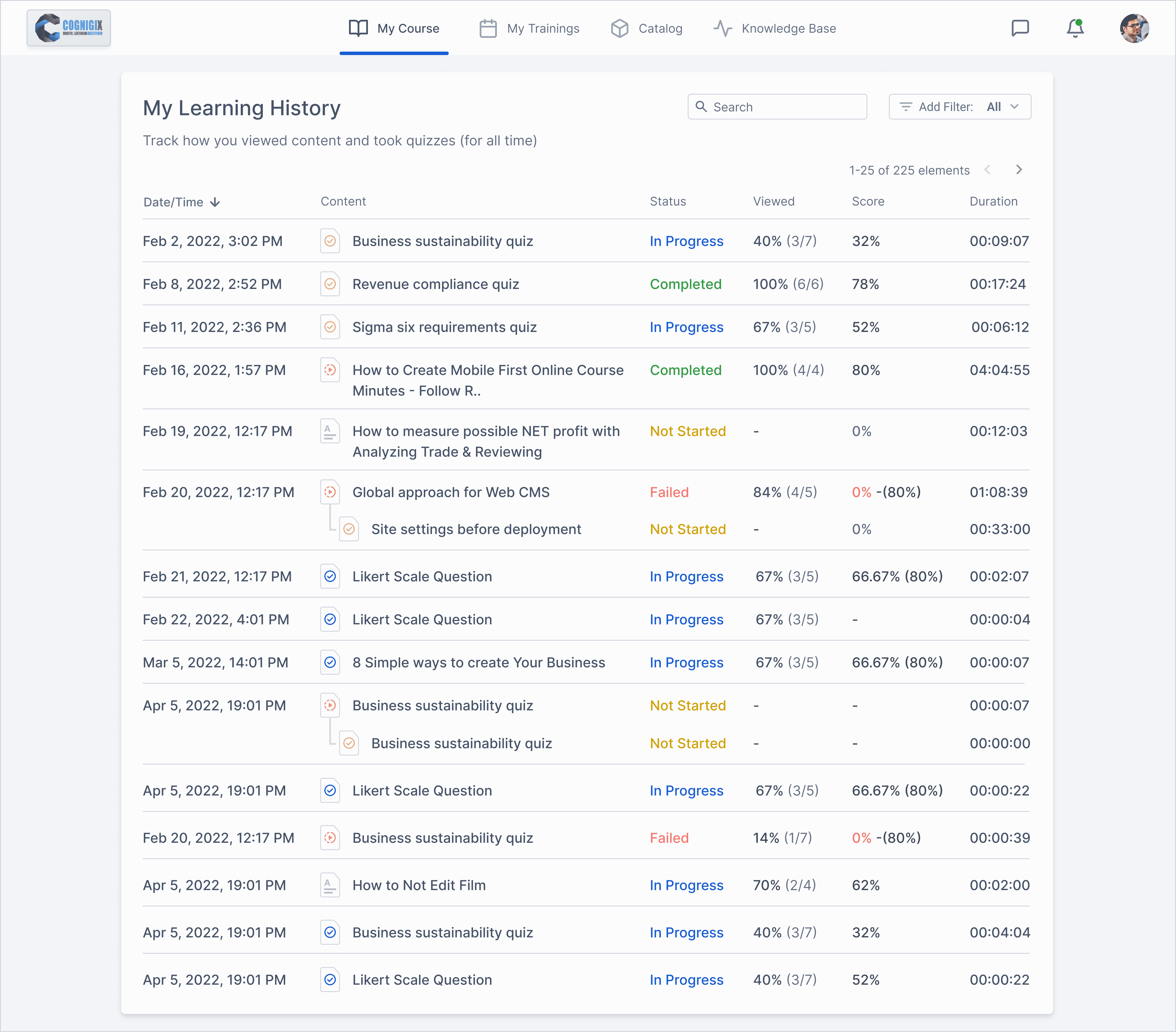
In the My Training History section, learners can view how they were progressing through the courses. The history can be sorted by the following parameters:

In the My Training History section, learners can view how they were progressing through the courses. The history can be sorted by the following parameters:

• Date/Time

• Date/Time

• Content title

• Content title

• Status

• Status

• View percentage

• View percentage

• Score

• Score

• Duration

• Duration

Learning History consist of content view status along with score & duration.

Used table format to represent data.

  • Used different color codes to represent course journey status.

  • Used different icons to represent content types as: Quiz, Text, Video etc.

Learning History consist of content view status along with score & duration.

Used table format to represent data.

  • Used different color codes to represent course journey status.

  • Used different icons to represent content types as: Quiz, Text, Video etc.

In the My Training History section, learners can view how they were progressing through the courses. The history can be sorted by the following parameters:

In the My Training History section, learners can view how they were progressing through the courses. The history can be sorted by the following parameters:

• Date/Time

• Date/Time

• Content title

• Content title

• Status

• Status

• View percentage

• View percentage

• Score

• Score

• Duration

• Duration

Learning History consist of content view status along with score & duration.

Used table format to represent data.

  • Used different color codes to represent course journey status.

  • Used different icons to represent content types as: Quiz, Text, Video etc.

Learning History consist of content view status along with score & duration.

Used table format to represent data.

  • Used different color codes to represent course journey status.

  • Used different icons to represent content types as: Quiz, Text, Video etc.

This 4 variables have 2 states either fixed or flexible ex: fixed time, flexible duration vice-versa.

This 4 variables have 2 states either fixed or flexible ex: fixed time, flexible duration vice-versa.

My Course

My Course

Learning History consist of content view status along with score & duration.

Used table format to represent data.

  • Used different color codes to represent course journey status.

  • Used different icons to represent content types as: Quiz, Text, Video etc.

Learning History consist of content view status along with score & duration.

Used table format to represent data.

  • Used different color codes to represent course journey status.

  • Used different icons to represent content types as: Quiz, Text, Video etc.

This 4 variables have 2 states either fixed or flexible ex: fixed time, flexible duration vice-versa.

This 4 variables have 2 states either fixed or flexible ex: fixed time, flexible duration vice-versa.

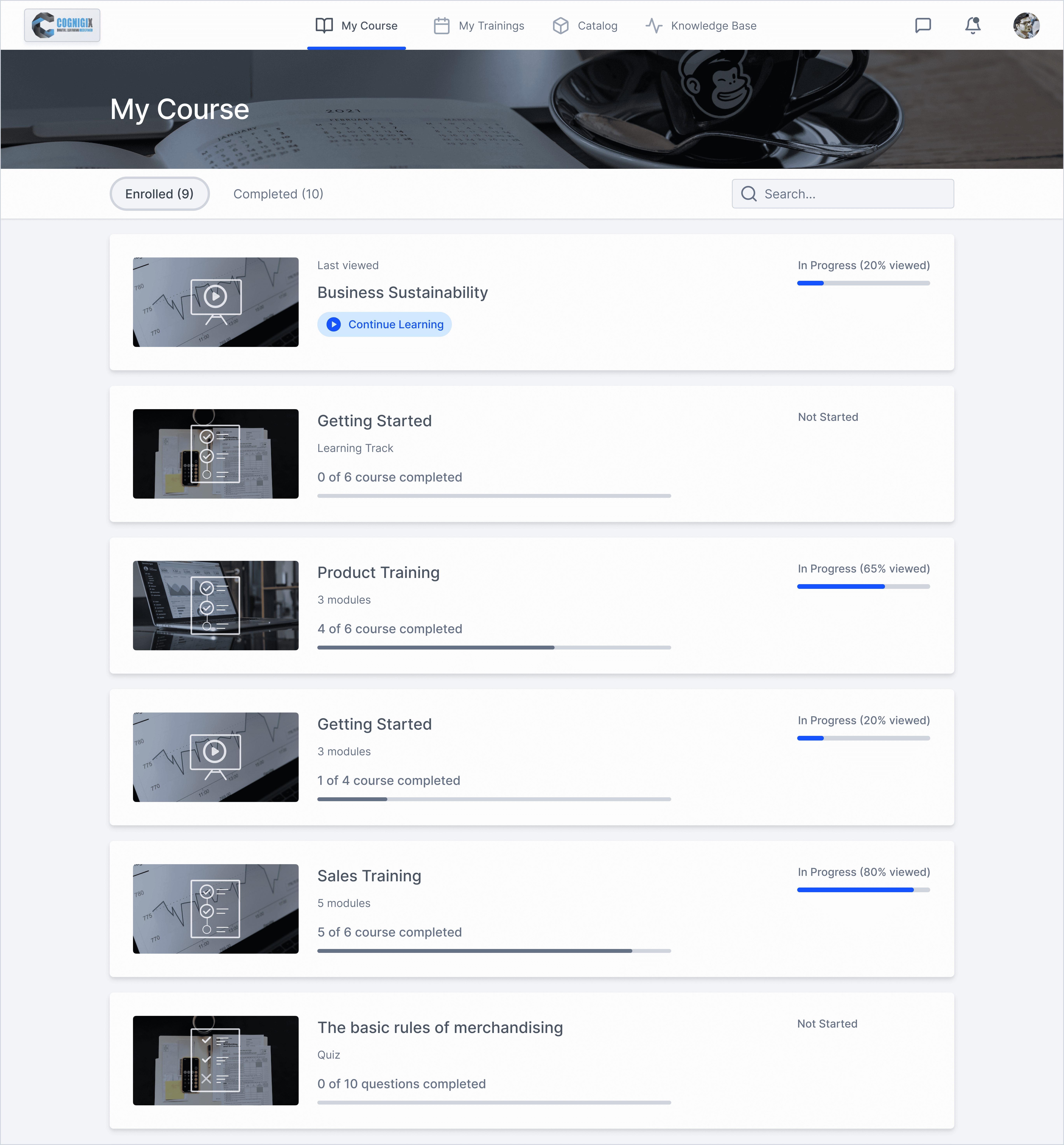
When the administrator enrolls users into a course, the course appears under the Enrolled tab of the My Courses section of the User Portal. 

When the administrator enrolls users into a course, the course appears under the Enrolled tab of the My Courses section of the User Portal. 

Sorting

Sorting

In the User Portal, courses and learning tracks are sorted as follows:

In the User Portal, courses and learning tracks are sorted as follows:

  • First, the course that the user viewed most recently.

  • First, the course that the user viewed most recently.

  • And last, courses from the Catalog that students added themselves.

  • And last, courses from the Catalog that students added themselves.

  • Then, the courses assigned by the instructor.

  • Then, the courses assigned by the instructor.

Search

Search

To search a course by the title, description, or tags, use the search bar at the top right corner of the My Courses page. Start typing text and the system will leave matching items on the page.

To search a course by the title, description, or tags, use the search bar at the top right corner of the My Courses page. Start typing text and the system will leave matching items on the page.

Color Independent Access

Color Independent Access

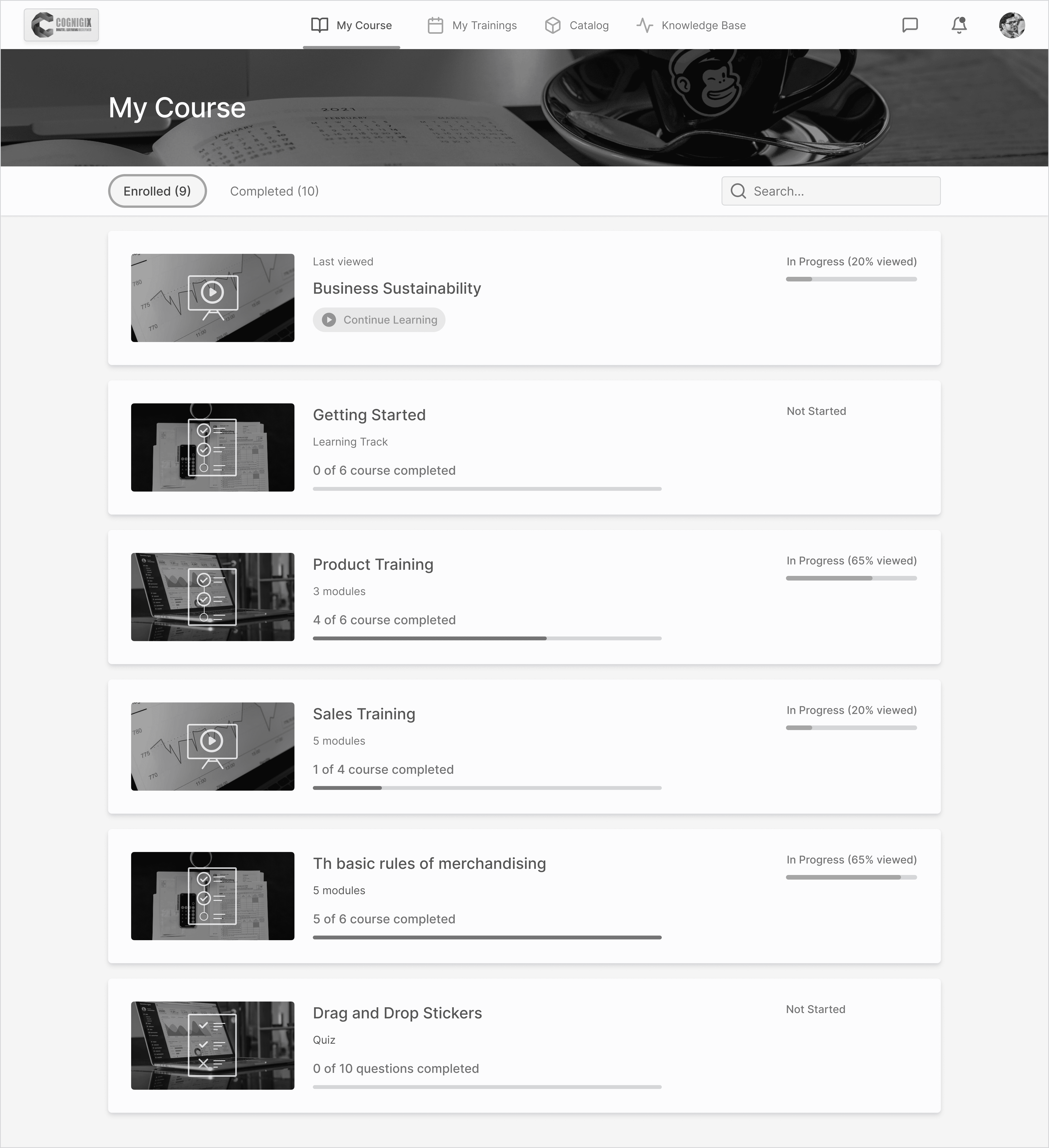
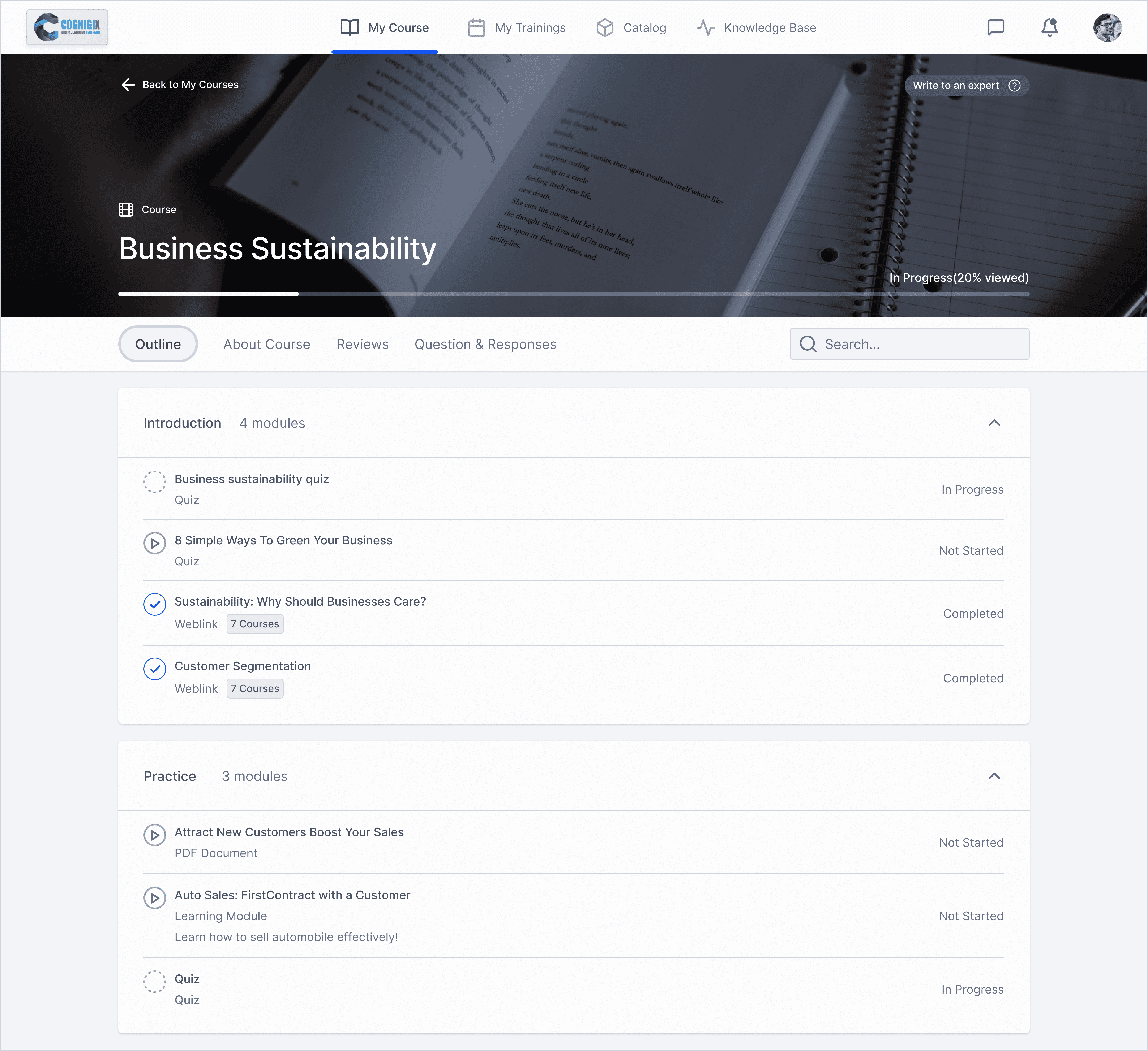
Here UI is shown in Greyscale, a view that user from color blindness has.

Here UI is shown in Greyscale, a view that user from color blindness has.

In order to make UI accessible color contrast is given priority, along with giving meaningful affordance to information-bearing elements, UI controls, decorative & disabled elements.

In order to make UI accessible color contrast is given priority, along with giving meaningful affordance to information-bearing elements, UI controls, decorative & disabled elements.

For example outline stroke to Enrolled-tab, using high contrast color for progress indicator, using an active bar at the bottom of navigation-tabs.

For example outline stroke to Enrolled-tab, using high contrast color for progress indicator, using an active bar at the bottom of navigation-tabs.

Taking Courses

Taking Courses

In the My Courses section, users can view the list of the assigned content and start taking courses and content items.

In the My Courses section, users can view the list of the assigned content and start taking courses and content items.

On the opened page, you can view the content title, description, status, and due date if available.

On the opened page, you can view the content title, description, status, and due date if available.

Here different UI elements are used to state the difference in content status

Here different UI elements are used to state the difference in content status

Key Findings

Key Findings

It was really interesting to reflect on the vast amount of variables and design considerations that need to be made even in common user experiences like filling out a form.

It was really interesting to reflect on the vast amount of variables and design considerations that need to be made even in common user experiences like filling out a form.

Keeping the Team & Client Posted

Keeping the Team & Client Posted

Being able to present my progress regularly during our meetings allowed the entire team to be in the same loop; and concerns could be raised earlier.

Being able to present my progress regularly during our meetings allowed the entire team to be in the same loop; and concerns could be raised earlier.

Collaboration with PM

Collaboration with PM

By actively listening to each other’s ideas, PM and I were able to work together seamlessly and efficiently to ensure we were on schedule.

By actively listening to each other’s ideas, PM and I were able to work together seamlessly and efficiently to ensure we were on schedule.

Lessons Learned:

Lessons Learned:

Best Practice ≠ Best Solution

Best Practice ≠ Best Solution

Choosing between a single vs. multi-page form taught me that design-thinking is contexually-based on target users and their desired objectives.

Choosing between a single vs. multi-page form taught me that design-thinking is contexually-based on target users and their desired objectives.

Ask Questions!

Ask Questions!

Speaking up and asking questions & clear any possible assumptions.

Speaking up and asking questions & clear any possible assumptions.

To document your daily decisions of projects you are working on, this will help us to know on what context & problem type we made decisions that not might sound reasonable or even logical in future.

To document your daily decisions of projects you are working on, this will help us to know on what context & problem type we made decisions that not might sound reasonable or even logical in future.

What I could've done better:

What I could've done better:

Push for User Testing

Push for User Testing

Although this client project was on a short timeline, user testing would have been extremely beneficial in supporting our design hypotheses.

Although this client project was on a short timeline, user testing would have been extremely beneficial in supporting our design hypotheses.

Create a free website with Framer, the website builder loved by startups, designers and agencies.